Leave Your Message
So, you're trying to pick an industrial PC board? Honestly, don't start with the catalog—start with the actual machine. For a packaging line, you might need dual LAN ports, the ability to handle higher temps, and reliable operation right next to the motors. But a lab controller? That's a different story—low noise, compact dimensions, and just the right expansion slots. It's all about context, really. You know, when you're picking a board, you've got to think about what it's actually going to be doing, how much room you have in the enclosure, how you like to maintain things, and whether you might want to upgrade down the road.
So, MarketsandMarkets reckons the industrial PC market might climb from around $5.3 billion in 2023 to $7.2 billion by 2028. Grand View Research, on the other hand, points to automation, edge computing, and digitalization in manufacturing as the big drivers. But here's the thing—different reports give different numbers, and that gap actually matters. You can't just look at market size and assume any old industrial PC board will fit your factory's needs.
KC Liu, the guy behind Advantech, once said something like, 'The Internet of Things isn't really about technology—it's a business model.' And honestly, that hits home here. You want a board that fits into your business process, not just a spec sheet full of numbers. So, dig into the processor's lifecycle, check if the BIOS is solid, see if the watchdog works as promised, make sure the OS plays nice, and verify they'll keep supplying the thing. But don't stop at paper—test it in real conditions: vibration, heat, dust, network load. Because, let's face it, a datasheet won't tell you when it's going to fail on you.
Small details really do matter, don't they? I mean, take a locked power connector – that alone can save you a ton of downtime. And having two separate Ethernet ports? That can make machine segregation way easier. Sure, fanless cooling keeps dust out, but it might mean you can't push performance for long stretches. That's where the perfect selection gets a bit fuzzy. Honestly, engineers tend to overestimate processing power and underestimate how important service access is. So, a solid decision? It's about combining what you've learned in the field, actual supplier evidence, independent reports, and a proper test plan – you can't skip that. You'd think the best industrial PC board would be the one with the most raw power, right? But honestly, that's rarely what makes it the best. The one that truly earns its keep is the one that just keeps chugging along, even when the factory's running at full tilt and things get crazy.
How to Choose the Right Industrial PC Board?
What Defines an Industrial PC Board?
An Industrial Computer Board is designed for stable operation in demanding environments. It is more than a desktop board with a stronger label. Engineers evaluate temperature range, vibration resistance, power stability, and long-term component availability. These factors matter when a machine must run beside motors, dust, or frequent electrical noise.
One detail is easy to miss. The board’s connectors must match the equipment’s real wiring, not only the project diagram. Check serial ports, network interfaces, display outputs, storage connections, and expansion slots. A control cabinet may have little space, so mounting holes and board dimensions deserve careful measurement. Watchdog functions, remote monitoring, and error reporting can also reduce downtime when software stops responding.
Reliability depends on the complete design. A board may support a fast processor, but poor cooling can create unstable temperatures inside a sealed cabinet. Industrial memory, protected power input, and suitable capacitors can improve service life. Still, no board solves every problem. I once overlooked cable clearance during planning; the specification looked correct, but installation became awkward. That mistake shows why physical testing matters. Ask for thermal data, operating limits, lifecycle information, and clear technical documentation before approval. A practical test under expected load is often more revealing than a polished datasheet.
| Selection Dimension | What Defines an Industrial PC Board | Typical Industrial-Grade Options | Why It Matters | Recommended Choice by Application |
|---|---|---|---|---|
| Operating Temperature | Specifies the temperature range in which the board can operate reliably and maintain electrical stability. |
0°C to 60°C -20°C to 70°C -40°C to 85°C |
Industrial cabinets, outdoor equipment, and factory floors may experience wide temperature changes. | Choose an extended-temperature design for outdoor, transportation, or unconditioned environments. |
| Processor and Performance | Determines computing capacity, graphics capability, multitasking performance, and software compatibility. | Low-power embedded processor; multi-core x86 processor; higher-performance processor with integrated graphics. | Insufficient processing power can limit machine vision, database operations, analytics, or real-time control. | Use low-power processing for control gateways and higher-performance processing for vision and edge AI workloads. |
| Memory Support | Includes memory type, maximum capacity, socket configuration, and support for error-detecting memory where applicable. | Up to 32 GB or 64 GB industrial-grade DDR4 or DDR5 memory, depending on the platform. | Memory capacity affects application loading, virtualization, data buffering, and long-term system responsiveness. | Select sufficient capacity for the operating system, applications, databases, and future expansion. |
| Storage Interfaces | Defines available interfaces for solid-state storage, removable media, and industrial data logging. | M.2 NVMe or SATA, 2.5-inch SATA, CompactFlash or other removable storage interfaces. | Storage choice affects boot speed, write endurance, shock resistance, serviceability, and data retention. | Use industrial SSD storage with suitable write endurance for continuous logging and 24/7 operation. |
| Expansion Capability | Refers to slots and connectors for additional communication, motion-control, data-acquisition, or graphics cards. | Mini PCIe, M.2 expansion, PCIe x1, PCIe x4, PCIe x16, or proprietary industrial expansion formats. | Expansion flexibility allows the system to adapt to changing automation and connectivity requirements. | Choose the required slot type and lane bandwidth before selecting the enclosure or backplane. |
| Industrial I/O | Includes interfaces used to connect sensors, controllers, displays, storage devices, and field equipment. | USB, serial ports, dual LAN, digital I/O, GPIO, display outputs, audio, and optional isolated interfaces. | Native I/O reduces the need for external converters and can simplify wiring and maintenance. | Prioritize the number, type, isolation, and connector location of every required interface. |
| Serial Communication | Supports legacy and modern industrial devices through interfaces such as RS-232, RS-422, and RS-485. | One or more configurable serial ports, commonly with selectable RS-232, RS-422, or RS-485 operation. | Serial communication remains widely used in programmable controllers, meters, drives, and industrial instruments. | Select RS-485 for multidrop networks and longer cable runs when supported by the connected equipment. |
| Network Connectivity | Defines network speed, port count, controller features, and suitability for segmented industrial networks. | One or two Gigabit Ethernet ports; higher-speed Ethernet on selected platforms; optional wireless connectivity. | Multiple ports can separate machine, management, and plant networks and improve system integration. | Choose dual LAN when network segregation, redundancy, or separate control and data paths are required. |
| Power Input | Specifies input voltage range, connector type, power protection, and tolerance for electrical disturbances. | Common DC inputs include 9–36 VDC or 12–24 VDC, with overvoltage, undervoltage, and reverse-polarity protection. | Industrial power systems may experience voltage fluctuations, electrical noise, and transient conditions. | Match the board to the actual supply range and verify protection requirements for the installation. |
| Cooling Method | Describes how heat is removed from the processor and other high-power components. | Fanless heat-sink cooling; forced-air cooling; external heat-spreader or chassis-assisted cooling. | Fanless designs reduce moving parts and dust ingress, while active cooling may support higher processing loads. | Use fanless cooling for dusty or vibration-prone areas when the thermal design supports the workload. |
| Mechanical Form Factor | Defines board dimensions, mounting holes, connector placement, and compatibility with the target enclosure. | 3.5-inch single-board computer, Pico-ITX, Mini-ITX, Micro-ATX, or custom industrial board formats. | Mechanical compatibility affects installation space, cable routing, service access, and system cost. | Select the smallest form factor that provides the required I/O, expansion, cooling, and serviceability. |
| Reliability and Lifecycle | Includes component selection, validation procedures, long-term availability, and documented revision control. | Industrial-grade components, extended product availability, controlled revisions, and burn-in or environmental testing. | Long equipment lifecycles require stable hardware to reduce redesign, qualification, and maintenance risks. | Confirm availability planning, revision policy, repair options, and technical support before deployment. |
| Environmental Resistance | Considers resistance to vibration, shock, humidity, dust, electromagnetic interference, and electrical noise. | Secure connectors, conformal-coating options, reinforced mounting, shielding, and tested vibration or shock performance. | Factory machinery and mobile equipment can expose the board to mechanical and electrical stresses beyond office conditions. | Specify environmental requirements using measurable limits rather than relying only on the term “industrial.” |
| Operating System Support | Determines compatibility with the operating system, drivers, firmware, real-time software, and security tools. | Support may include Windows IoT, Linux distributions, real-time Linux, or other embedded operating systems. | Driver availability and software stability affect commissioning time, updates, cybersecurity, and maintenance. | Verify driver, firmware, watchdog, remote-management, and security requirements before purchasing. |
| Application Fit | Matches the board’s performance, I/O, environmental, and lifecycle characteristics to the actual workload. | Machine control, HMI, industrial gateway, data logger, machine vision, edge analytics, or transportation system. | A board optimized for one application may be inefficient, unreliable, or difficult to maintain in another. | Create a requirements checklist covering performance, I/O, temperature, power, dimensions, and lifecycle. |
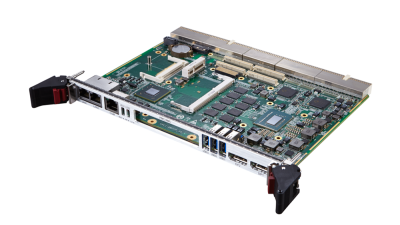
The CPCI-QM77P is a 6U CompactPCI x86 industrial single-board computer designed to deliver dependable third-generation Core i7 performance in demanding environments. Its flexible 17W to 45W processor options balance computing capability with system power requirements, while the QM77 platform and dual-channel ECC DDR3 memory support up to 16GB for stable data processing. This architecture is well suited to industrial automation, transportation control, defense-related equipment, and other applications where continuous operation and predictable performance are essential.
Built for system integration, the board supports three independent displays, four Gigabit Ethernet ports, USB 3.0, multiple serial interfaces, and SATA storage with RAID capability. PMC and XMC expansion interfaces allow users to adapt the platform for specialized I/O and processing needs, while TPM-based remote management helps strengthen system administration and operational oversight. The standard working temperature range is -20°C to +60°C, with an extended version supporting -40°C to +65°C for harsher conditions. Multi-operating-system compatibility further simplifies deployment across varied industrial platforms.
Measure the board area, mounting points, airflow path, and service space. Leave room for cable bends and heat. A paper fit may fail beside a hot motor.
Choose a compact board for narrow cabinets and limited installation depth. Choose Mini-ITX when you need more expansion. More space helps.
It suits equipment needing several replaceable modules. A single-board computer can simplify wiring and reduce cabinet depth. Match the architecture to maintenance needs.
Review Ethernet, RS-232, isolated RS-485, CAN, USB, GPIO, and digital I/O. Two independent Ethernet connections can separate supervisory and machine networks. Unused ports still add cost.
No. Extra connectors can increase heat, cost, wiring, and failure points. Select interfaces your machine will actually use. I sometimes over-specify ports.
Check connector locking, cable bend radius, vibration exposure, and heatsink clearance. Screw-lock connections can resist cabinet vibration better than loose plugs. Test the physical layout.
Fanless cooling reduces moving parts, but it still depends on proper airflow. Check cabinet temperature, heat paths, and nearby motors. Passive cooling is not magic.
Test storage, PCIe expansion, display outputs, drivers, and operating system support. Use a prototype with several meters of cable. Real hardware reveals awkward spacing and signal problems.
Choosing the right Industrial Pc Board begins with understanding its role in an embedded system and the conditions in which it will operate. Evaluate the required processor performance, memory capacity, storage options, and expansion capability according to current workloads and future upgrades. The board’s form factor and architecture should also match the available enclosure, installation method, and system design. Carefully compare interfaces such as USB, serial, Ethernet, display, and other peripheral connections to ensure smooth integration with existing equipment.
Reliability is equally important in industrial environments. Consider resistance to temperature changes, vibration, dust, moisture, and continuous operation when assessing durability and protection. Compatibility with operating systems, drivers, software, and connected devices can prevent costly redesigns. Finally, review product lifecycle policies, documentation, technical support, and long-term availability. A well-selected Industrial Pc Board should deliver stable performance today while offering sufficient flexibility, dependable protection, and support for future maintenance and system expansion.