Leave Your Message
0%

Honestly, picking the best Embedded Pc for industrial work starts with where it's going to live—not just the processor. On a factory floor, a computer can get hit by dust, vibration, heat, electrical noise, and sudden power changes. A system you can actually rely on has to survive all that for years, often without someone checking on it every day. Fanless cooling helps here: less dust gets pulled in, and there are no moving parts to wear out. But it can also hold you back when the workload gets heavy. That trade-off is worth testing carefully.

Industrial buyers should look at more than the CPU. Check memory options, storage endurance, operating temperature, and the available I/O. Serial ports, isolated Ethernet, USB, CAN bus, and digital inputs can matter way more than a sleek enclosure. And of course, the computer needs to support the OS and software stack you're actually running. Long product lifecycles, spare parts, remote management, and responsive tech support are just as important. Certifications and test reports? They can be useful evidence, but a label by itself doesn't prove it'll survive in the field.

There's no universal winner.

A strong Embedded Pc should match the real risks of your application. For machine vision, sustained CPU or GPU performance may be essential. For data collection, stable communication and low power draw might matter more. Before buying, engineers should go through thermal measurements, vibration results, and electromagnetic compatibility (EMC) documentation. And then test it with real peripherals and production software. A spec sheet can look great. Real-world integration might still expose weak spots. So the best choice isn't the most powerful model—it's the one that stays dependable, serviceable, and suited to the factory's long-term conditions.
What Is the Best Embedded PC for Industrial Use?

Defining the Role of an Embedded PC in Industrial Environments

What Is the Best Embedded PC for Industrial Use?

In industrial environments, an embedded PC is more than a compact computer. It acts as a dependable control, monitoring, and communication layer between machines and operators. A suitable unit may collect sensor data, display production metrics, or process camera images near the equipment. This local processing reduces delays when cloud connectivity becomes unstable. In practice, a factory floor can be hot, dusty, noisy, and full of vibration. The computer must continue working there.

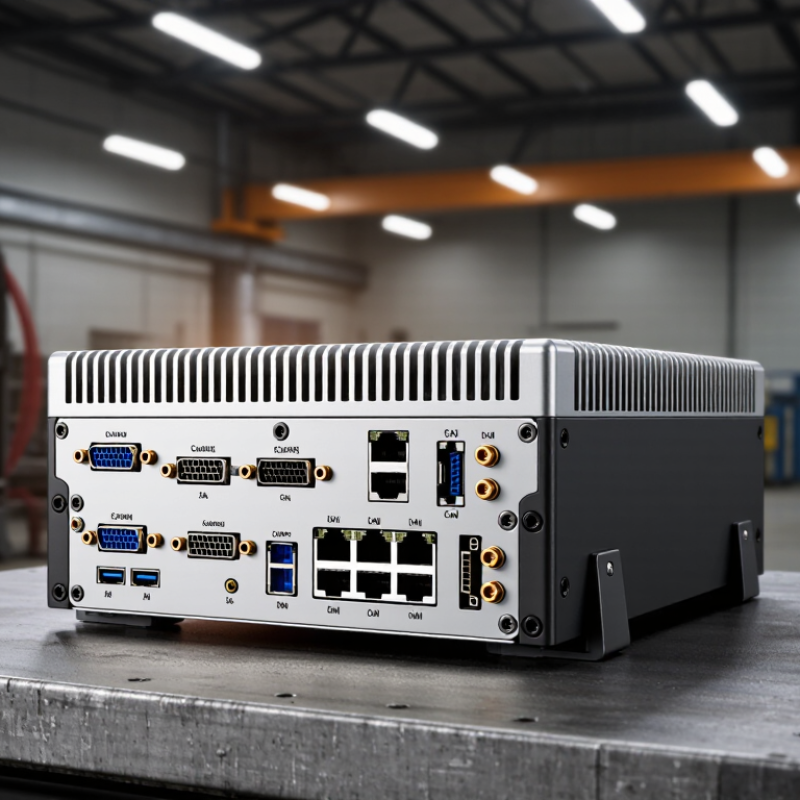
Hardware selection should begin with the working conditions, not processor speed alone. A fanless design can reduce dust intake and mechanical failure points. Wide temperature support matters beside ovens, motors, or unconditioned warehouses. Multiple industrial interfaces may connect sensors, controllers, cameras, and network equipment. Storage should resist vibration and support frequent data recording. Secure boot, user access controls, encrypted communication, and update procedures also deserve attention. They are operational requirements, not optional extras.

A common mistake is choosing a powerful system without checking its long-term availability. An industrial computer may need support for many years. Replacing it can interrupt production and force expensive software changes. I would also test recovery behavior before deployment. What happens after a power interruption? Can technicians diagnose a failed connection without opening the cabinet? No design is perfect. A system may run reliably yet lack enough expansion space later. Documented testing, clear maintenance access, and realistic workload trials usually reveal these weaknesses before installation.

Identifying Core Performance and Connectivity Requirements

What Is the Best Embedded PC for Industrial Use?

Choosing the best embedded PC starts with the machine’s actual workload, not the processor label. In factory installations, I first measure application demand, response time, and operating temperature. A six-core processor may handle image analysis smoothly, yet waste power in a simple controller. Raw speed is not everything. Stable performance matters more during long production shifts. For vision systems, select enough CPU and GPU capacity for real-time image processing. For machine control, predictable response and low latency usually matter more. Thermal design also deserves attention. Small enclosures trap heat. An Embedded Itx platform can provide useful expansion space, but its cooling plan must match the installation.

Connectivity determines whether the system works reliably beyond the workbench. I check the number and type of Ethernet ports, supported network speeds, and hardware isolation. Serial interfaces remain important for older sensors, drives, and control equipment. USB ports should support the required cameras, storage devices, or service tools without awkward adapters. Wireless connectivity may help remote diagnostics, but it should not replace a dependable wired connection in critical operations. One overlooked detail is connector strength. Loose cables can stop a line faster than a slow processor.

Memory capacity, storage endurance, and remote management also influence real-world value. Industrial storage should tolerate frequent writes and vibration. ECC memory can reduce risks in sensitive applications, although it may increase cost. I have seen systems pass laboratory tests but struggle inside dusty, warm cabinets. That experience changed my evaluation process. I now request thermal logs, network tests, and maintenance access details before approving a design. The best choice is rarely the most powerful model; it is the one that remains predictable when conditions become imperfect.

What Is the Best Embedded PC for Industrial Use? - Identifying Core Performance and Connectivity Requirements

Representative industrial embedded PC configurations. Actual specifications vary by enclosure, processor generation, expansion options, and environmental certifications.
Configuration Type Recommended Workload Processor Class Memory Storage Industrial Connectivity Expansion Typical Power Input Typical Operating Temperature Best-Fit Priority
Compact Control PLC coordination, HMI, machine monitoring, protocol conversion 4-core low-power x86 processor, typically up to 15 W TDP 8–16 GB industrial-grade memory 128–512 GB industrial SSD 2–4 × Gigabit Ethernet; 2–4 × USB; optional serial ports Mini PCIe or M.2 for wireless or fieldbus modules 9–36 VDC Approximately −20°C to 60°C Low power, compact installation, reliable I/O
Balanced Automation SCADA, MES data collection, visualization, gateway services, light analytics 4–8-core industrial x86 processor, approximately 15–35 W TDP 16–32 GB industrial-grade memory 256 GB–1 TB industrial NVMe SSD 2–6 × Gigabit Ethernet; optional 2.5GbE; USB 3.x; serial and CAN options M.2, Mini PCIe, or isolated expansion slots 9–36 VDC or 12–24 VDC Approximately −20°C to 60°C Best overall balance of performance, connectivity, and cost
Machine Vision Multi-camera inspection, image processing, quality control, high-speed data capture 8–16-core performance x86 processor, approximately 35–65 W TDP 32–64 GB industrial-grade memory 1–4 TB NVMe SSD, preferably with data-protection features 2.5GbE or 10GbE options; multiple USB 3.x; industrial camera interfaces where required PCIe or MXM-class slot for frame grabber or accelerator 12–24 VDC; higher power may be required with a discrete GPU Approximately 0°C to 50°C under sustained high load High CPU throughput, fast storage, and deterministic camera connectivity
Edge AI Real-time inference, predictive maintenance, anomaly detection, robotics analytics 8–16-core processor with integrated or discrete AI acceleration 32–64 GB industrial-grade memory 512 GB–2 TB NVMe SSD with optional redundant storage Multiple Gigabit or 2.5GbE ports; optional 10GbE; USB 3.x; wireless options PCIe, M.2, or dedicated accelerator interface 12–24 VDC; commonly 60–150 W depending on accelerator Approximately −10°C to 50°C under continuous AI workloads Inference performance per watt, thermal management, and expansion flexibility
Harsh-Environment Outdoor cabinets, transportation systems, remote monitoring, dusty or vibration-prone sites Low- to mid-power 4–8-core industrial processor 8–32 GB industrial-grade memory with long-life support 128 GB–1 TB industrial SSD with enhanced shock resistance 2–4 × Ethernet; isolated serial, CAN, digital I/O, and optional cellular connectivity Sealed expansion access or externally accessible industrial connectors 9–36 VDC with surge, reverse-polarity, and over-voltage protection Approximately −40°C to 70°C when specifically designed for extended temperature operation Environmental durability, passive cooling, shock resistance, and service life
Selection guideline: The best industrial embedded PC is determined by the workload rather than processor speed alone. Prioritize sustained thermal performance, sufficient memory, industrial SSD endurance, isolated interfaces, required network bandwidth, power-input protection, operating-temperature requirements, and long-term availability.

Comparing Industrial Embedded PC Form Factors and Designs

Choosing the best industrial embedded PC starts with its form factor, not its processor. A box PC suits control cabinets with limited space and varied I/O needs. A DIN-rail model mounts neatly beside relays and power supplies. Panel PCs combine computing and display functions, reducing cable clutter but limiting replacement flexibility. Compact COM designs offer greater customization, although integration requires stronger engineering resources.

The X86 Embedded Pc remains practical for machine vision, SCADA, and edge analytics. Its software compatibility can reduce migration risks. However, fanless cooling is not automatically safer. In a dusty cabinet, a sealed aluminum chassis may outperform a faster unit with exposed airflow. MarketsandMarkets reports that the industrial PC market is projected to grow at roughly 7% annually through the decade. Grand View Research also identifies factory automation and edge computing as major demand drivers.

Field experience shows that connector placement matters more than brochures suggest. A side-facing Ethernet port can force a sharp cable bend against a cabinet wall. DIN-rail units save depth. Panel units save installation time. Service teams may prefer removable storage and accessible terminals. That preference is often ignored.

There is no universal winner. This is the difficult part. Report figures use different market definitions, so buyers should treat forecasts as direction, not proof. Thermal testing at the actual cabinet temperature remains essential. A small prototype, tested beside motors and power converters, can expose weaknesses that laboratory specifications miss.

Industrial Embedded PC Form Factors: Nominal Board Footprint

Smaller form factors generally support tighter machine integration, while larger boards provide more room for connectors, expansion, cooling, and serviceability. Values represent nominal standardized board dimensions; enclosure size and mounting clearance can be larger.

Reference dimensions: COM Express, PC/104, 3.5-inch SBC, and Pico-ITX form-factor specifications.

Evaluating Reliability, Durability, and Environmental Protection

Choosing the best Embedded Box Pc for industrial use starts with reliability, not processing speed. In a factory, a computer may run continuously beside motors, pumps, and welding equipment. Heat, vibration, dust, and unstable power can expose weak designs quickly. I have seen systems pass office tests but fail after weeks near a production line.

A dependable unit should use industrial-grade components and support long operating cycles. Fanless cooling reduces dust intake and removes a common mechanical failure point. However, fanless does not mean heat-proof. Check the operating temperature range and leave space around the enclosure. A sealed metal housing can protect internal circuits from dust and moisture. Look for a suitable IP rating, but verify how testing was performed. Marketing language can be vague.

Durability also depends on mounting and connectors. Locking connectors resist vibration better than loose consumer plugs. Shock-resistant storage helps when machines start suddenly. The power input should tolerate voltage changes and include practical protection against surges. Electromagnetic compatibility matters near variable-frequency drives. I would also examine service access, cable strain, and replacement timelines before purchase. These details are easy to overlook. They matter later.

Environmental protection is never a single specification. A humid room, an outdoor cabinet, and a dusty workshop create different risks. Condensation may damage electronics even when liquid water never enters. In my view, testing the computer inside the intended cabinet is wiser than trusting laboratory figures alone. Real installations are messier. Clearance, airflow, grounding, and maintenance habits can decide whether industrial reliability becomes daily reality.

Selecting the Right Processor, Storage, and Expansion Options

What Is the Best Embedded PC for Industrial Use?

Selecting the Right Processor, Storage, and Expansion Options

The best embedded PC depends on the machine, environment, and workload. A factory gateway may need modest processing, while vision inspection demands stronger multicore performance. Select a processor with thermal headroom, not merely the highest benchmark score. Sustained loads can reduce performance inside a sealed cabinet. That detail is easy to miss.

Storage choice affects uptime. Industrial systems often benefit from solid-state storage with power-loss protection and strong write endurance. Check temperature ratings, data retention, and replacement procedures before installation. A removable storage module can simplify maintenance, but it may introduce vibration concerns. Keep it secure. Capacity also needs realistic forecasting. Logs, images, and updates can consume space faster than expected.

Expansion options should match both current equipment and likely upgrades. Look for suitable serial, Ethernet, USB, digital I/O, and fieldbus interfaces. PCIe or M.2 expansion can support additional communication, capture, or acceleration hardware. However, every added module increases heat, power use, and configuration work. In one practical assessment, a smaller computer with native interfaces proved more reliable than a faster unit requiring several adapters. That result may not apply everywhere, but it is worth considering. Verify connector access, mounting space, cable clearance, and remote diagnostics before purchase. A specification sheet rarely shows the awkward service angle inside a crowded control panel.

Assessing Software Compatibility, Security, and Lifecycle Support

Choosing an Embedded Mini Pc for industrial use starts with software compatibility, not processor speed. The device should support the required operating system, container tools, drivers, and real-time applications. Test one unit with actual PLC data, camera feeds, and database workloads. A glossy specification sheet cannot reveal driver conflicts.

Security needs practical evidence. The 2024 Data Breach Investigations Report recorded a 180% increase in vulnerability exploitation. Industrial systems often remain connected for years, so secure boot, hardware-based encryption, signed firmware, and controlled USB access matter. NIST SP 800-193 also emphasizes platform resiliency through protection, detection, and recovery. Ask whether the supplier publishes CVE responses and patch timelines. “Security by design” sounds good. Verify it.

Lifecycle support can determine the real cost. The 2024 X-Force Threat Intelligence Index identified manufacturing as the most attacked industry, accounting for 25% of observed incidents. Long availability, spare units, BIOS maintenance, and predictable operating-system support reduce forced redesigns. Industrial temperature ratings and fanless construction help, but they do not replace software discipline. I would request a five-year roadmap, vulnerability disclosure process, and tested recovery image. Some vendors promise long life yet provide vague end dates. That gap deserves scrutiny. Sentence by sentence, the evaluation may feel excessive, but one undocumented update can stop a production line.

FAQS

How should I choose an industrial embedded PC?

Start with the machine’s workload, response time, and operating temperature. A six-core processor may be unnecessary for a simple controller. Real-time vision tasks need enough CPU and GPU capacity. Stable performance matters more than impressive specifications.

Does a faster processor always provide better industrial performance?

No. A powerful processor can waste energy in a low-demand system. Predictable response and low latency may matter more than maximum speed. The best choice fits the workload, not the label.

Why is thermal design important in compact industrial computers?

Small cabinets can trap heat around the computer. Leave clearance around the enclosure for airflow and service access. Fanless cooling reduces dust intake, but it does not remove heat. I once trusted a laboratory result too much. The cabinet behaved differently.

Which connectivity features should an industrial PC include?

Check Ethernet quantity, network speed, isolation, serial ports, and USB capacity. Serial ports still support older sensors, drives, and control equipment. USB connections should handle cameras, storage, and service tools directly. Loose cables can stop production faster than slow processing.

Is wireless connectivity suitable for critical industrial operations?

Wireless access can support remote diagnostics and maintenance. It should not replace dependable wired communication during critical operations. A wired connection is usually more predictable. Convenience is not reliability.

What storage and memory features improve industrial reliability?

Choose storage designed for frequent writes, vibration, and long operating periods. ECC memory can reduce data errors in sensitive applications. It may also increase system cost. The decision needs testing, not guesswork.

How can an industrial computer handle dust, moisture, and vibration?

Consider a sealed metal housing and a suitable protection rating. Verify how the rating was tested. Locking connectors resist vibration better than loose consumer plugs. Condensation remains a risk, even without visible water.

What should be tested before approving an industrial PC design?

Test the computer inside its intended cabinet and working environment. Record thermal behavior during realistic production loads. Check network stability, grounding, cable strain, and maintenance access. I would also confirm replacement timelines. Small details become expensive later.

Conclusion

Choosing the best Embedded Pc for industrial use requires more than comparing processor speeds. It begins with understanding how the system will operate within an automation, monitoring, control, or edge-computing environment. The ideal unit should provide sufficient processing power, dependable connectivity, and compatibility with required industrial networks and peripherals. Its form factor should also match available space, installation methods, cooling needs, and maintenance access.

Reliability is equally important. Industrial systems should be designed to withstand vibration, dust, temperature changes, and continuous operation, while appropriate protection ratings can improve long-term stability. Buyers should evaluate processor efficiency, storage durability, expansion flexibility, and support for current operating systems and applications. Security features, remote management, regular updates, and a clearly defined product lifecycle are also essential. By balancing performance, physical durability, connectivity, software compatibility, and future support, organizations can select an Embedded Pc that delivers stable operation and practical long-term value.
William

William

William is a seasoned marketing professional with a strong commitment to innovation and excellence. Since joining YDSTECH in 1999, he has played a pivotal role in the company's focus on independent research and development in the industrial computer sector. With a profound understanding of the......
Previous How to Choose a China Compact Industrial Computer?